Order entry slows down when every purchase order brings a new set of discrepancies: unfamiliar product codes, different units of measure, details scattered across emails and PDFs, and prices that do not match the catalog.
Specialists resolve these issues by checking multiple systems, interpreting customer-specific rules, and entering the final order into the ERP. Repeating this process manually creates delays and increases the risk of error.
AI order processing automates the routine work, validates each order against business data, and sends only uncertain cases for review. The real challenge is not reading the document but turning it into a correct, ERP-ready order.
What is AI order processing automation?
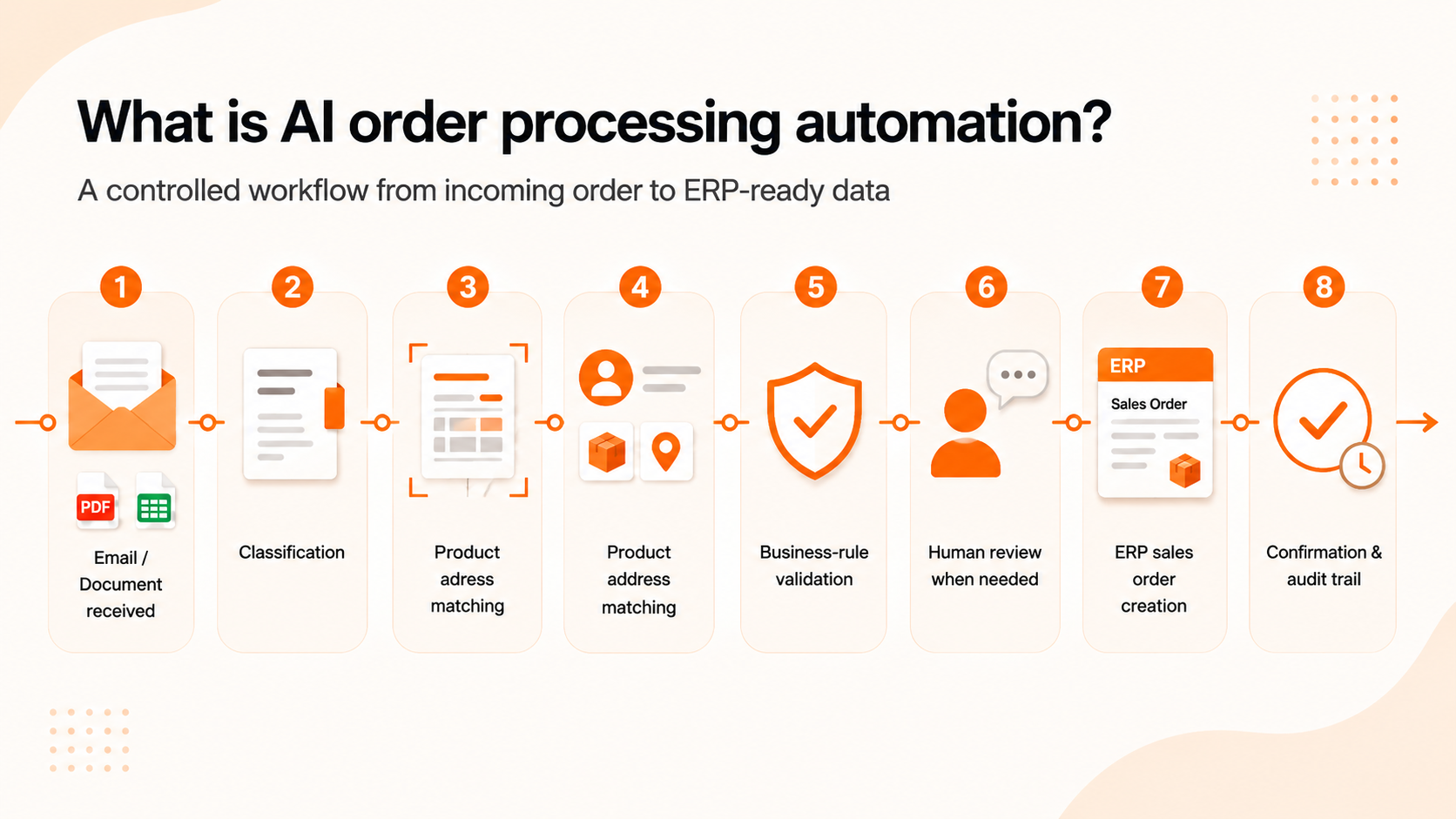
AI order processing automation uses document AI, business rules, and system integrations to convert purchase orders received by email, PDF, scans, or spreadsheets into validated sales-order data that an ERP can accept.
Basic OCR stops after reading text. Order processing continues by identifying the customer and line items, matching external product codes to internal SKUs, applying pricing and fulfillment rules, managing exceptions, and preserving a clear record of each decision.
A typical workflow looks like this:
1. Email or document received
2. Order classification
3. Text and table extraction
4. Customer, product and address matching
5. Business-rule validation
6. Human review when needed
7. ERP sales order creation
8. Confirmation, audit trail and monitoring
Each stage solves a different problem. Treating the whole workflow as a single AI prompt makes the system difficult to control and even harder to trust.
Why email and PDF orders are still difficult to automate
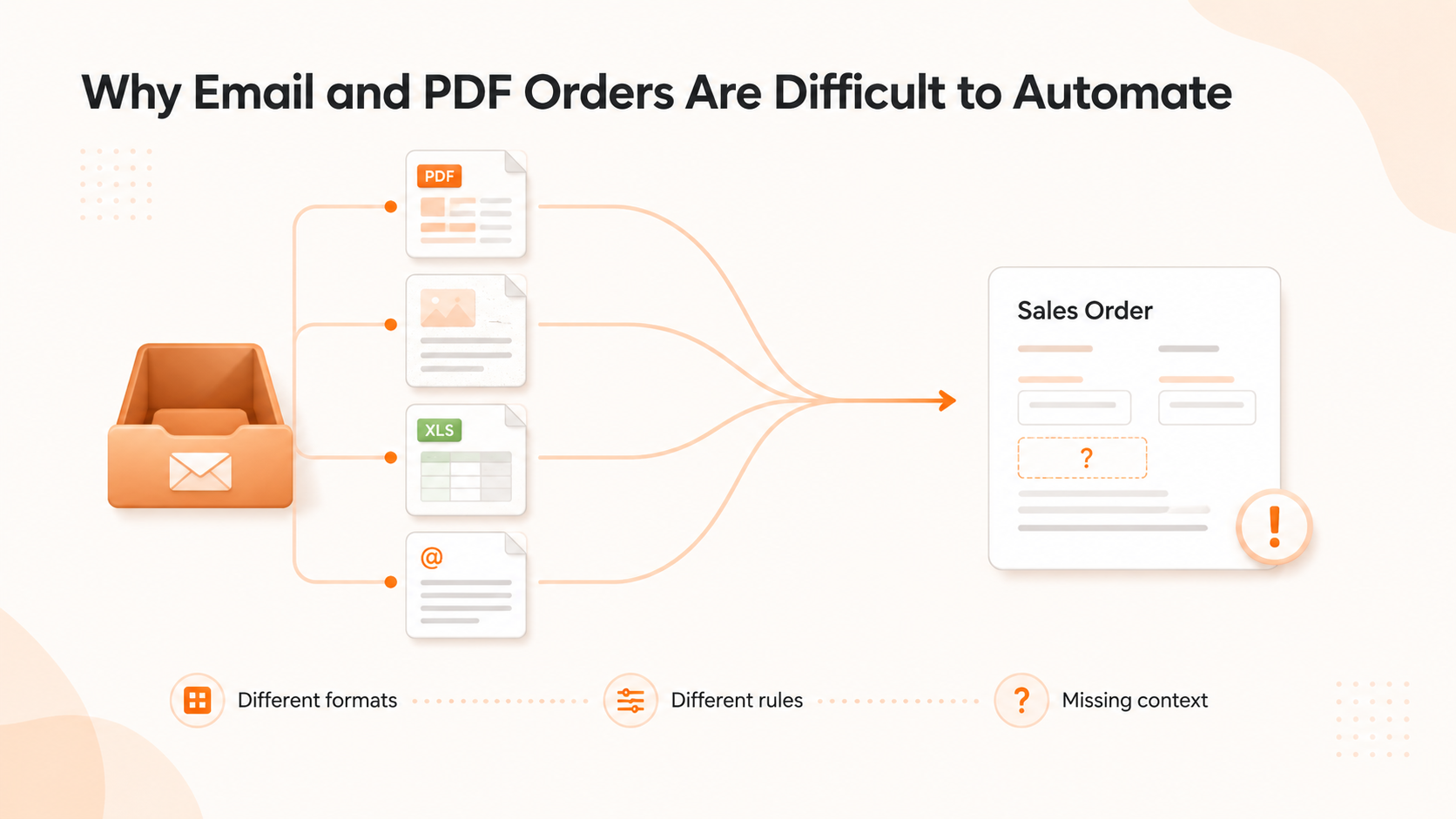
Many manufacturers and distributors already use an ERP, EDI, ecommerce portal, or order management system. Yet a significant part of the order flow may still arrive through email.
Customers send what is convenient for them:
- native PDFs exported from procurement software;
- scanned purchase orders;
- Excel spreadsheets;
- images or screenshots;
- tables pasted into an email;
- several attachments in one thread;
- revised orders with corrections in the message body;
- documents in different languages or layouts.
File format is only one source of complexity. The same value can mean different things depending on the customer, product, contract, or destination.
For example 12 BX may need to be converted to 120 EA. A customer's product code may map to another SKU in the ERP. The requested price may be correct for one contract but not another, and a valid shipping address may not be approved for that account.
A system can read every character correctly and still create the wrong sales order if it misses this context.
OCR reads the document. The workflow has to understand the order.
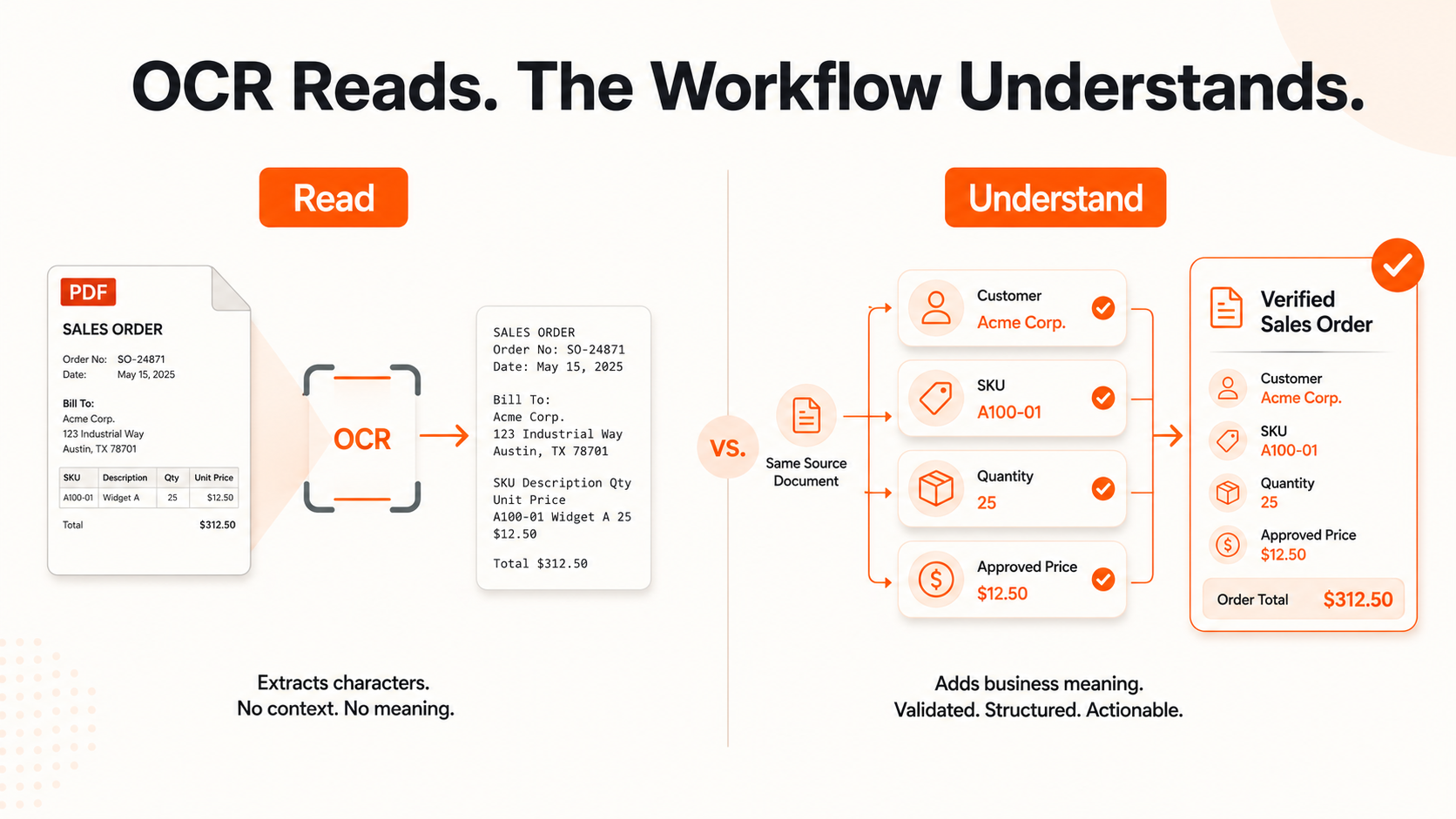
OCR converts visual content into machine-readable text. It remains useful, especially for scans and image-based PDFs, but text recognition is only the first technical layer.
A production order-processing system also needs to answer questions such as:
- Which attachment contains the current purchase order?
- Is this a new order, a revision, a cancellation, or a duplicate?
- Which number is the PO number and which is an internal quote reference?
- Does the customer’s product code match an active SKU?
- Are quantities expressed as pieces, boxes, packs, pallets, or another unit?
- Does the requested price match the contract or approved quote?
- Can the requested delivery date be met?
- Which legal entity, warehouse, or ship-from location should handle the order?
These decisions require several techniques working together: OCR, document parsing, language models, deterministic rules, master-data lookups, confidence scoring, and integration logic.
The AI component helps interpret variable documents and language. The surrounding software makes that interpretation safe enough to use. AWS describes a similar production pattern for intelligent document processing, where extraction is combined with workflow controls, validation, and scalable processing.
From incoming email to ERP-ready order data
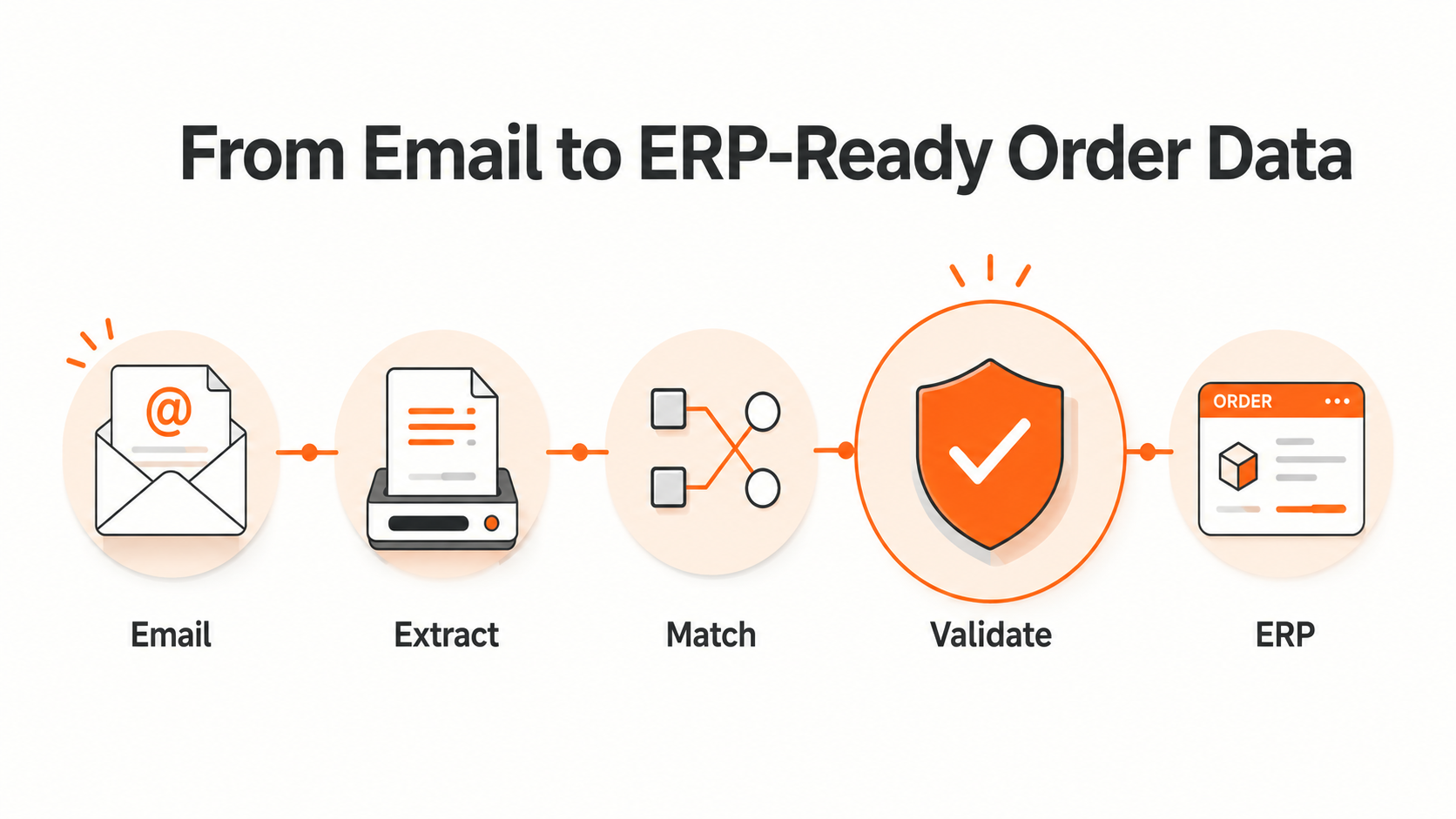
A reliable pipeline is easier to understand when it is broken into clear stages.
1. Capture and classify the incoming request
The system first connects to the channel where orders arrive, usually a shared mailbox. It records the message, sender, subject, thread, attachments, and receipt time before trying to process anything.
Classification determines what should happen next. An inbox may contain new orders, quote requests, delivery questions, order changes, invoices, spam, and general correspondence. Routing every attachment into the same extraction process wastes resources and increases the risk of a wrong action.
The classifier should also detect duplicate messages and revised documents. A forwarded email or customer correction must not silently create a second sales order.
2. Convert documents into structured candidates
The extraction layer reads the email body and attachments. Depending on the input, this can involve native PDF parsing, OCR, spreadsheet processing, table recognition, or image analysis.
The output at this stage should be treated as a set of candidates, not as confirmed order data.
For example: A structured schema gives the rest of the system something predictable to validate. It also prevents an AI model from inventing new fields or returning a different format for every document.
3. Resolve the customer, products and units
Extracted text rarely matches ERP master data perfectly.
The customer may use an old company name, a local branch name, or an email alias. Product codes may be customer-specific. Descriptions may contain abbreviations. Units of measure may differ between the purchase order and the ERP.
This stage resolves those differences by checking the extracted values against customer, catalog, pricing, inventory, and address records.
A strong matching process may use exact identifiers first, then approved mapping tables, then semantic or fuzzy matching for unresolved values. The order should not progress automatically when several plausible matches exist.
The same principle applies to unit normalization. The system can convert 12 BOX to 120 EA only if the product’s packaging rule confirms that one box contains ten units. A language model should not guess that conversion from context.
4. Apply business-rule validation
Once the entities are resolved, the system can validate the order against the rules that determine whether it is commercially and operationally valid.
Typical checks include:
- customer account status;
- duplicate PO number;
- valid product and customer-SKU mapping;
- minimum order quantity;
- pack-size and unit-of-measure conversion;
- contract, catalog, or quoted price;
- currency and tax treatment;
- inventory availability;
- requested delivery date;
- authorized shipping address;
- credit limit or payment status;
- required product configuration;
- discontinued or replacement items.
Not every rule belongs in AI. Pricing, credit, authorization, and product constraints are usually better handled by deterministic logic connected to trusted business data.
AI is useful where the input is ambiguous. Business rules are necessary where the output must be exact.
5. Route exceptions to the right person
Good automation makes uncertainty visible and easy to resolve.
When the system cannot confidently identify a SKU, sees a price mismatch, finds an unapproved address, or receives contradictory instructions, it should create an exception rather than force the order through.
A useful review screen shows:
- the original email and document;
- the extracted field or line item;
- the proposed ERP value;
- the reason for the exception;
- supporting master-data or contract information;
- the action required from the reviewer.
This changes the team’s work from re-keying every order to reviewing only the cases that need judgment.
The correction should also become structured feedback. If a reviewer repeatedly maps the same customer code to the same SKU, the system can propose a permanent mapping rather than relearn the answer from scratch.
6. Create the sales order in the ERP
Only validated data should reach the ERP write-back stage.
The integration may use an API, middleware, an integration platform, EDI, a file exchange, or, where no reliable interface exists, carefully controlled UI automation. The method matters less than the transaction controls around it.
A production integration should support:
- idempotency, so retries do not create duplicate orders;
- clear validation before submission;
- transaction status tracking;
- retry and recovery logic;
- error messages that operations teams can understand;
- a link between the ERP order and the source email or document;
- rollback or manual recovery procedures where appropriate.
The ERP remains the system of record. The automation layer prepares, validates, and routes the data around it.
7. Confirm the result and preserve the audit trail
After the ERP accepts the order, the workflow may update the operations dashboard, notify the assigned team, send an acknowledgement to the customer, or trigger downstream fulfillment steps.
Every order should retain a traceable history:
Source email
- source document
- extracted value
- normalized value
- validation result
- human correction, if any
- ERP transaction
- confirmation or downstream action
This record is useful for troubleshooting, customer disputes, compliance, model evaluation, and process improvement. It also makes AI-assisted processing easier for employees to trust because the system can show how it reached an outcome.
What makes order data ERP-ready?
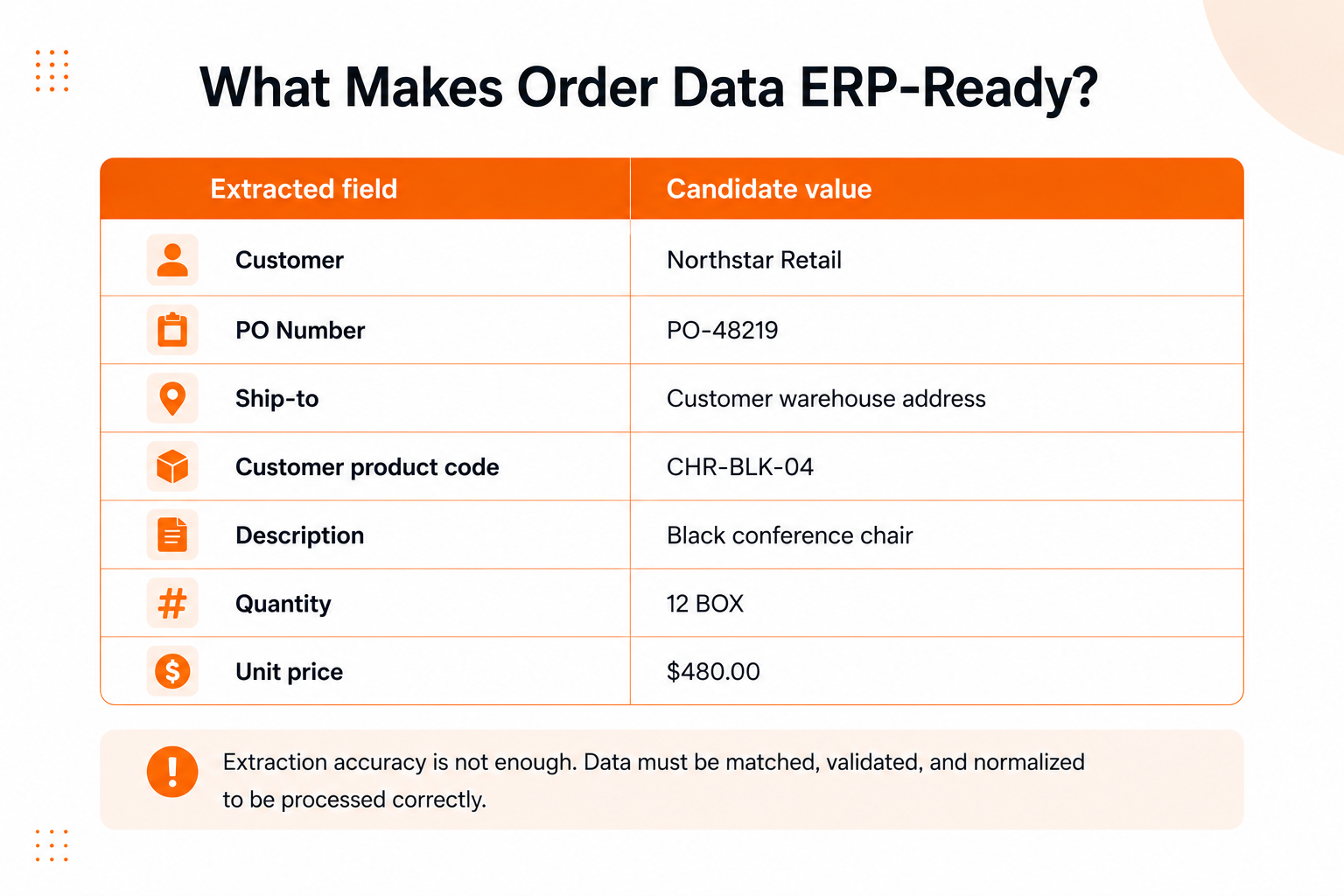
ERP-ready data is not simply text copied into JSON. It is order data that has been normalized, matched to the company’s master records, checked against business rules, and prepared in the exact structure required by the destination system.
This distinction matters because extraction accuracy alone does not measure whether an order can be processed correctly.
A field may be read accurately but matched to the wrong customer record. A product code may be recognized but no longer be active. A quantity may be extracted correctly but use the wrong unit. Measuring only OCR or field extraction hides these operational failures.
Where AI agents fit into order management

AI agents can extend the workflow beyond data extraction. An agent may classify incoming requests, collect missing information, compare an order with a quote, prepare a customer response, or coordinate several validation services.
Before giving an agent permission to act, the team needs to know whether it has enough context, clear boundaries, and a safe recovery path.
An agent may be allowed to request a missing PO number automatically. Changing a price, approving a credit exception, substituting a product, or committing a high-value order may still require deterministic rules or human approval.
A practical agentic workflow therefore needs:
- limited access to only the systems and data required for the task;
- defined actions and approval boundaries;
- structured outputs rather than unconstrained text;
- field- and order-level confidence thresholds;
- logs for tool calls, data lookups, and decisions;
- protection against untrusted instructions inside uploaded documents;
- a fallback path when the agent cannot complete the task safely.
The most reliable systems combine AI flexibility with conventional software controls. Autonomy belongs in parts of the process that the team understands and can recover, rather than anywhere a model can produce an answer. Deloitte's analysis of ERP in the agentic AI era follows the same architecture: core rules and records remain governed, while agents operate through a more flexible API-driven layer.
Why ERP integration should be designed early
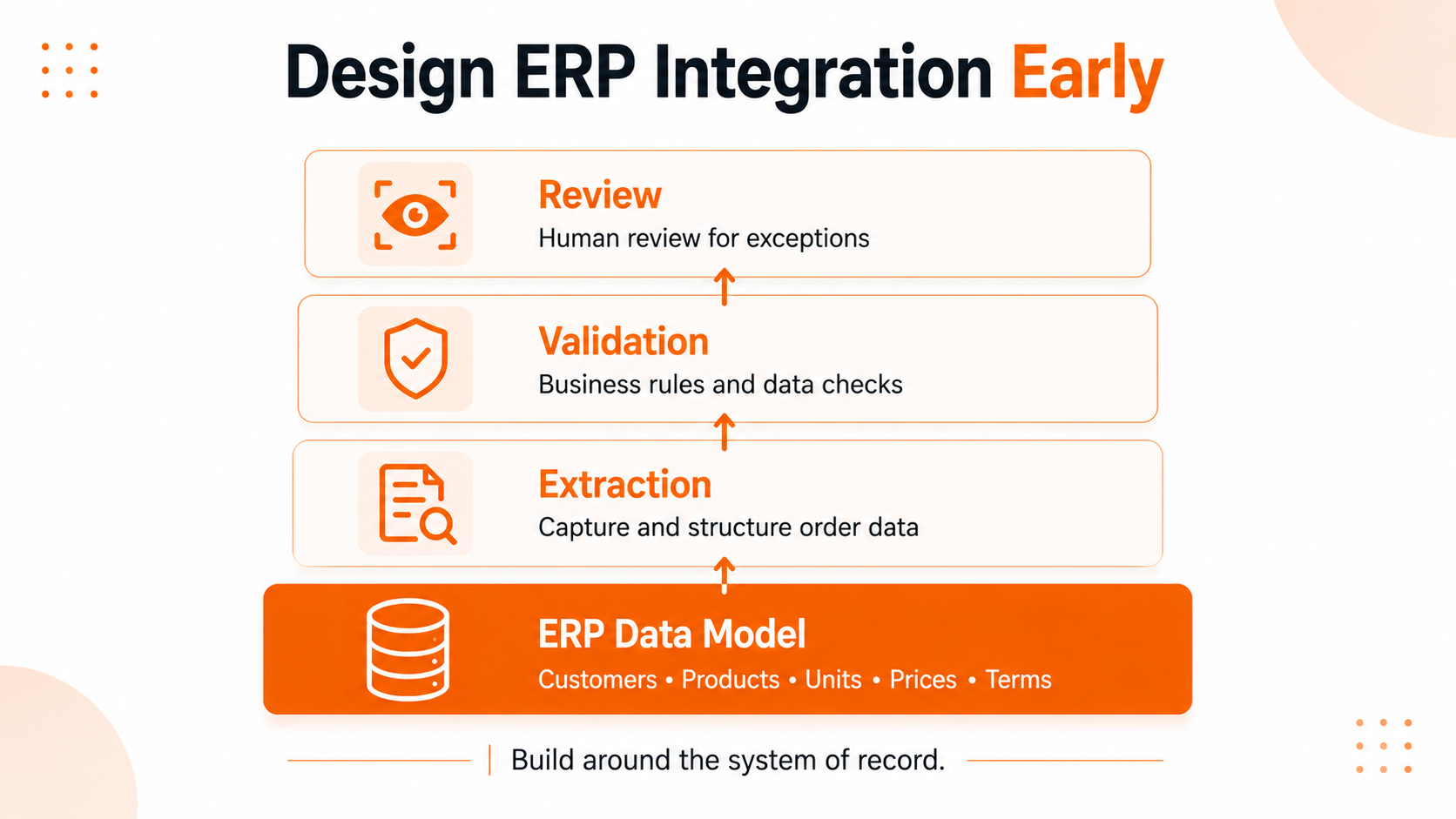
A proof of concept can extract fields from a small set of purchase orders without knowing much about the destination ERP. A production system cannot.
The ERP data model determines which fields are required, how customers and products are identified, which validation services are available, and what happens when a transaction fails. Those constraints should influence the extraction schema and workflow from the beginning.
Designing the integration late often creates avoidable problems. The AI output looks impressive in a demo, but operations teams still have to correct units, resolve product codes, check prices, and enter the final order manually.
This is why AI order automation works best as an integration project, not as a standalone OCR experiment. The document model, business rules, review interface, and ERP connector have to be designed as one workflow.
For companies with aging or heavily customized systems, a separate orchestration layer may be more practical than replacing the ERP. It can accept orders from email, EDI, portals, and other channels, apply shared validation logic, and send clean transactions into the existing system of record.
Security and deployment choices
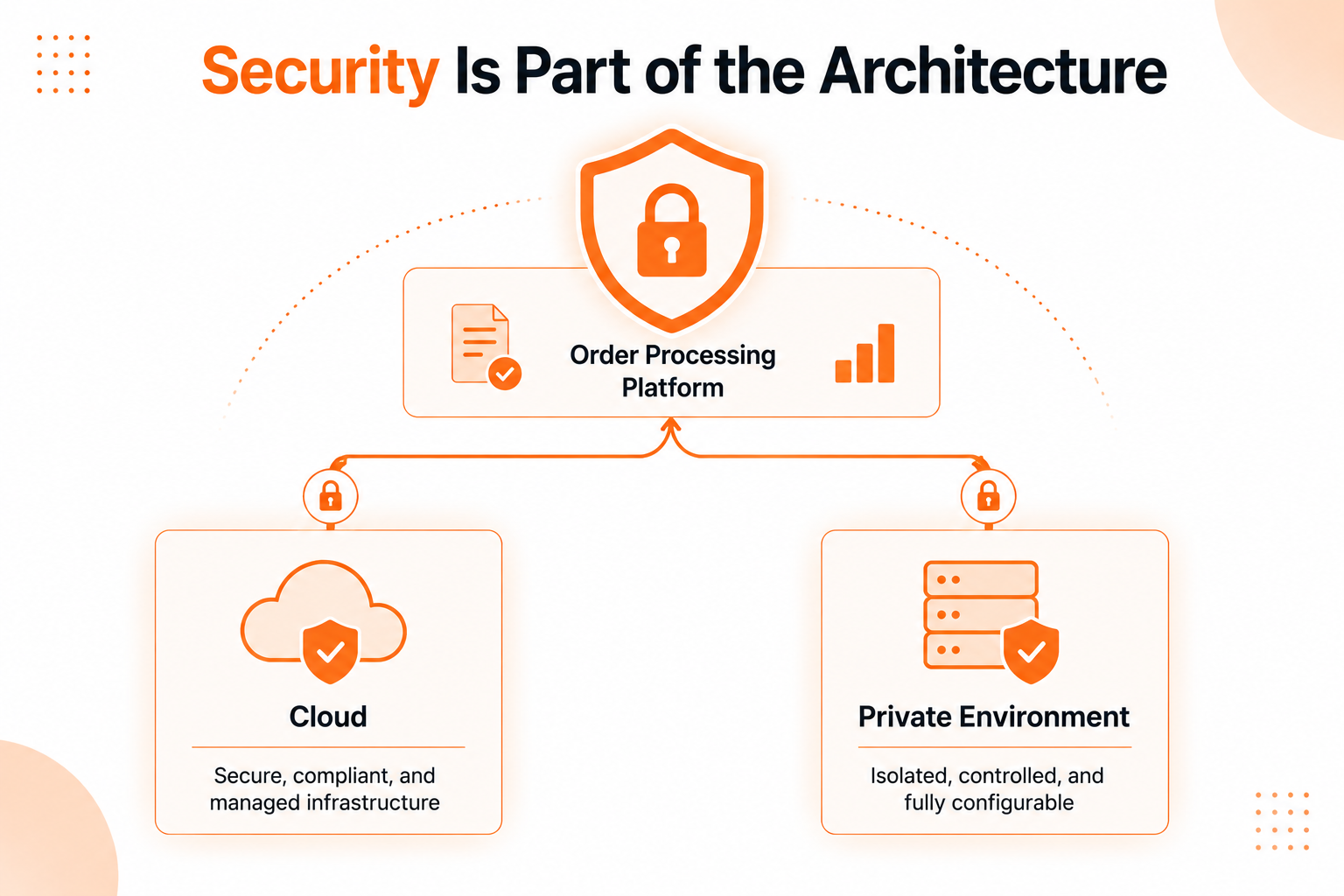
Purchase orders may contain customer identities, negotiated pricing, product specifications, shipping addresses, and commercially sensitive terms. The automation layer also needs access to inboxes and business systems. That makes security part of the architecture, not an optional hardening step.
Key controls include:
- least-privilege access to mailboxes and ERP APIs;
- encryption in transit and at rest;
- separation between tenants, business units, or customers;
- retention rules for source documents and extracted data;
- redaction where full document content is not needed;
- audit logs for automated and human actions;
- monitoring for unusual access or transaction patterns;
- validation of files and content before model processing;
- clear policies for external AI providers and model training.
Cloud AI services may be appropriate when their security, residency, and contractual terms match the business requirements. Private cloud or self-hosted models may be preferable when the company needs tighter data control, custom infrastructure, predictable deployment boundaries, or integration inside a restricted environment.
The choice should follow the risk model and operating requirements, not a blanket assumption that one deployment model is always better.
How to measure whether the system works
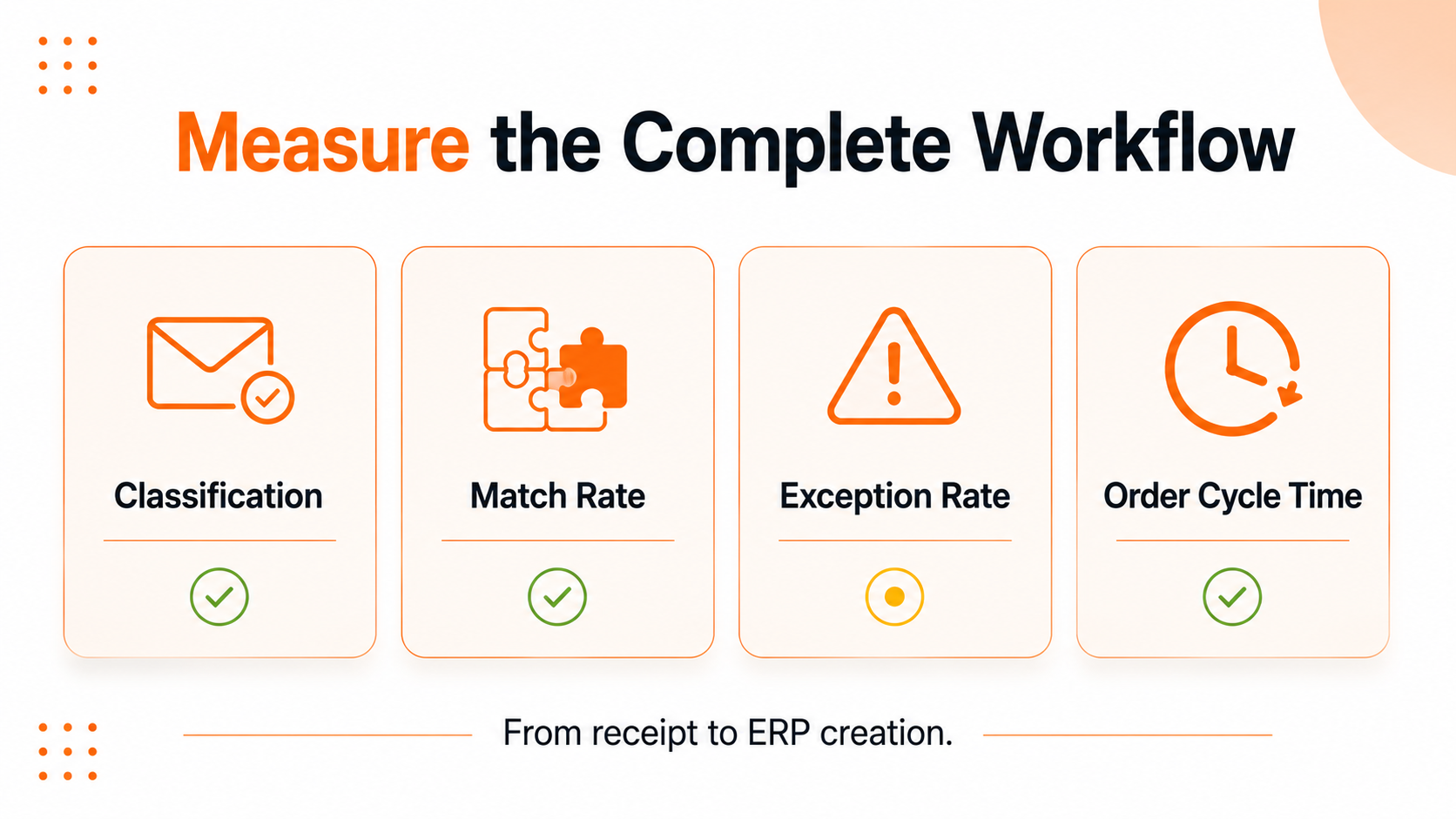
The first useful benchmark is the current process. Without it, teams can demonstrate that a model extracts fields but cannot show whether operations improved.
A pilot should measure the complete workflow:
- percentage of incoming orders correctly classified;
- field- and line-level extraction quality;
- customer and SKU match rate;
- percentage of orders that pass validation without intervention;
- exception rate by reason;
- average human review time;
- order cycle time from receipt to ERP creation;
- duplicate and failed transaction rate;
- corrections made after ERP posting;
- customer response or acknowledgement time.
These metrics should be segmented by customer, document type, language, order complexity, and source channel. A high average can hide weak performance on the documents that create most of the manual work.
The pilot dataset should include ordinary orders as well as difficult examples: scans, tables split across pages, handwritten notes, new products, price discrepancies, revised orders, unusual units, and multiple attachments. Testing only clean documents produces a demo, not a realistic production benchmark.
A real-world email order automation example
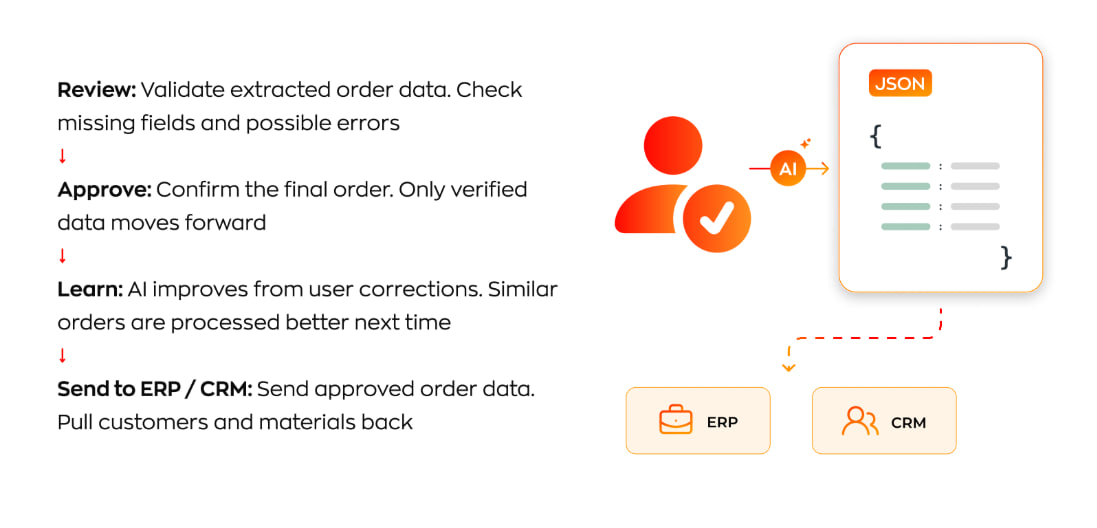
Aionys used this architecture in an AI-powered email order processing system for a furniture manufacturer.
The company received 15-20+ dealer orders per day through email in PDFs, images, scans, and spreadsheets. Manual processing took roughly 15-30 minutes per order before the data could enter the ERP, CRM, and production workflow. The process became difficult to scale as volume increased and product specifications remained complex.
The implemented system combined email classification, OCR and document parsing, AI-assisted data extraction, validation, routing, and ERP/CRM integration. The AI components were deployed inside the client’s own environment, giving the company control over its operational data and model infrastructure.
The result depended on the complete pipeline, which converted inconsistent dealer requests into traceable, system-ready records. No individual extraction model could have handled the full workflow on its own.
When custom AI order processing makes sense
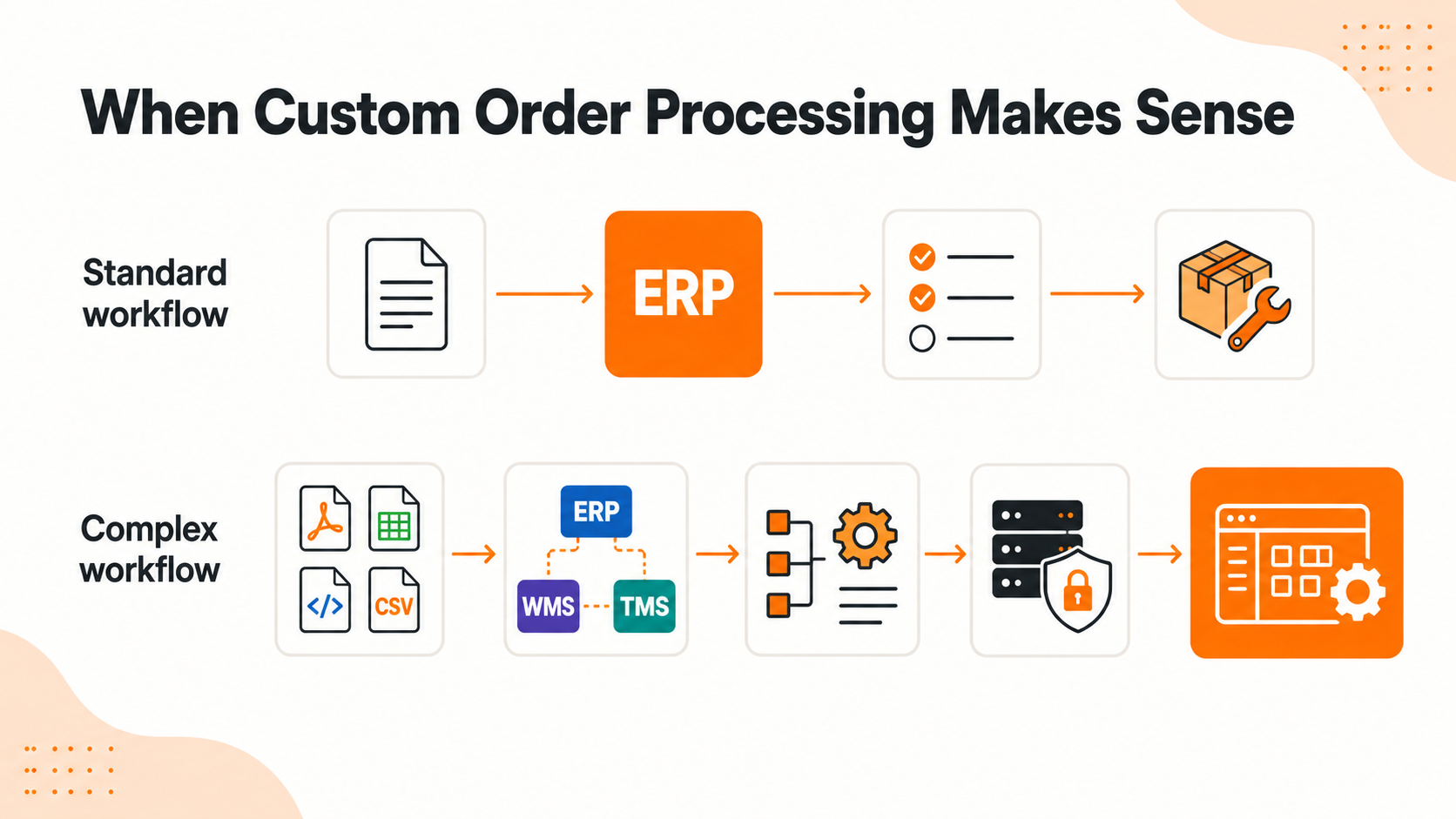
A packaged order automation platform is often the right choice when the workflow is standard, the ERP is well supported, deployment requirements are conventional, and the product covers most of the business rules without extensive workarounds.
TARVYX is one such packaged platform - it covers email and messenger intake, catalogue matching, and ERP-ready output without a custom build.
Custom development becomes more relevant when the process includes:
- unusual documents, configurations, or product specifications;
- customer-specific catalogs and part-number mappings;
- several ERP, CRM, WMS, or production systems;
- legacy interfaces or heavily customized ERP workflows;
- proprietary validation and approval rules;
- private or self-hosted AI requirements;
- a specialized review experience;
- broader automation beyond order entry;
- operational logic that is part of the company’s competitive advantage.
The decision is rarely a simple choice between buying and building everything. A practical architecture may combine a document AI service, existing ERP APIs, custom validation logic, and a purpose-built operations interface.
Conclusion
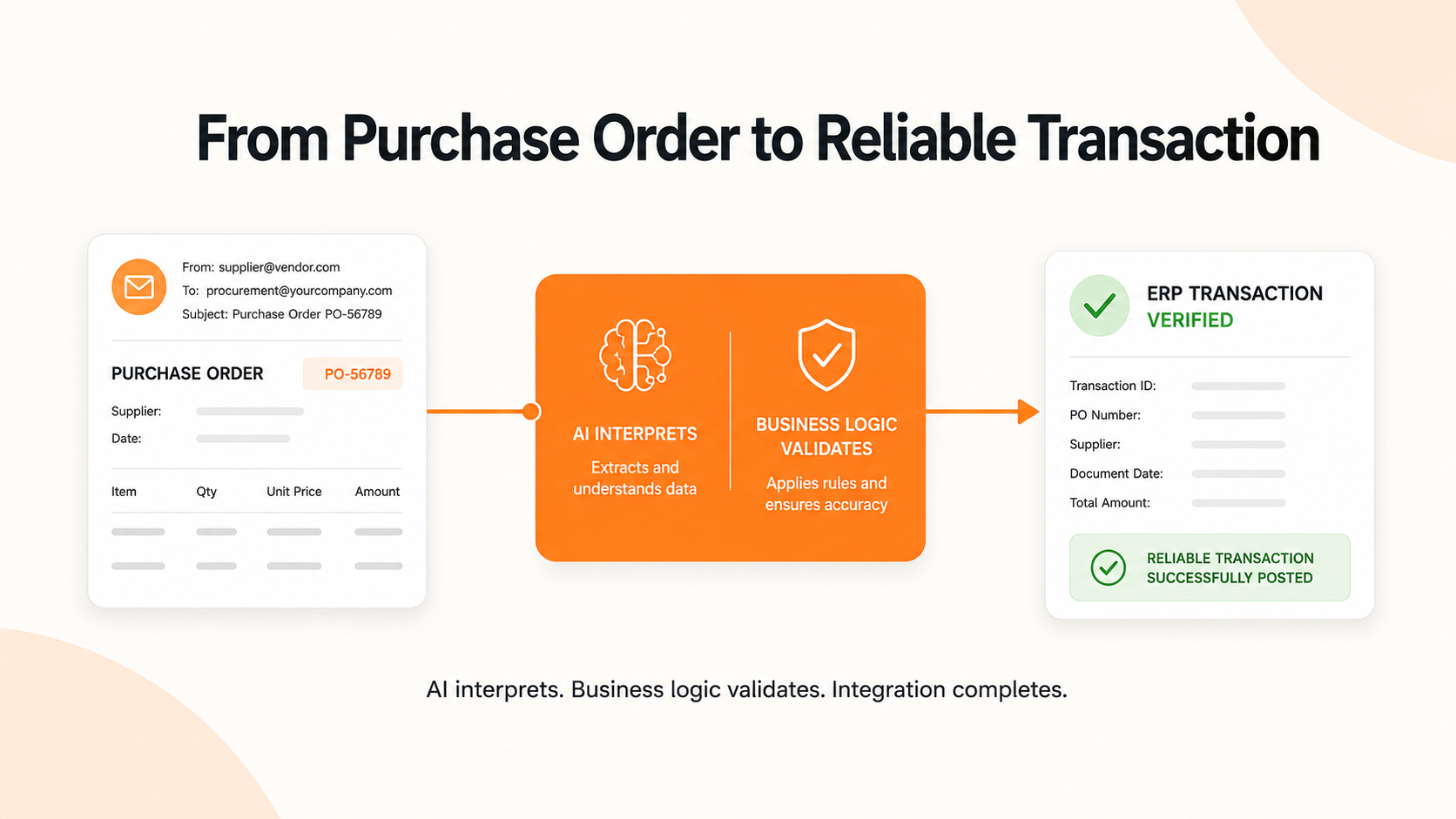
Turning an emailed purchase order into an ERP sales order requires more than reading a PDF. The system has to understand the request, resolve it against business data, enforce commercial rules, expose uncertainty, and complete a reliable transaction.
AI makes variable documents easier to process. ERP integration, validation logic, exception design, and auditability make the result usable in production. Aionys builds custom software for workflows that depend on document understanding, business rules, system integration, and reliable human oversight.
For order processing, that can include the ingestion pipeline, document AI layer, validation services, exception-management interface, ERP integration, monitoring, and secure deployment. The objective is not to add AI to every step. It is to remove repetitive work while preserving the controls the business needs.
If a packaged platform fits, compare the options: TARVYX vs. manual and custom setups.